How I Use AI As A Creative Professional
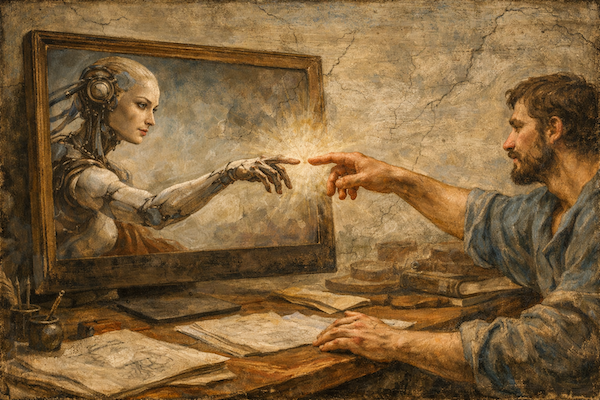
Since the early days of Midjourney I have been dabbling with AI tools. Partly from fascination/curiosity and partly to see if these tools could one day be adapted into my own creative and development pipeline.
A lot of people have reached out to ask whether I use AI and how I use it. I’m not an AI expert so this article is designed to provide a personal perspective on how I’ve experimented with AI tools and how I’m using it for various tasks, rather than a technical how to.
But before we begin, I want to address some of the controversies and hesitation that some people have (or have heard about) around AI.
Energy and Water Consumption
AI currently relies on large data centres which utilise both energy and water. If that energy comes from fossil fuels that’s not great. And water consumption is problematic especially in areas that don’t have a lot of reserves to begin with. I’m not going to justify the use of resources but I would only point out that consumption should be considered relatively. For example, some estimates place a year’s worth of AI queries (50-100 kg CO₂e) as being equivalent to
1kg of beef (36-100 kg CO₂e)
Flying 250–600 km in economy (50-100kg CO₂e)
900-1,800 hours of video streaming (50-100kg CO₂e).
Data Privacy
There are concerns around private information being uploaded to AI platforms. For example, financial and health data, as well as personal information that one might include when planning a trip or researching insurance policies.
Companies are beginning to develop their own in-house AI systems that are deliberately trained with company data so they’re not relying on third-party systems. Many AI platforms are also updating their policies and practices to assure users that they’re data will be kept safe and private.
But if you’re concerned about your own private information, I recommend downloading a local LLM (large language model) to your own PC (I’ve used Ollama).
This is like your own pre-trained AI that lives only on your computer. Everything is processed using your own CPU/GPU so there are no external API calls. (This also helps address the energy consumption issue mentioned earlier.) You can of course connect to the Internet using plugins but it’s not the default mode. The downside is that these local AI models are not as powerful.
Creative content used for training AI models.
This is one of the most unfortunate aspects about the state of AI.
Early models were trained using content without the express permission of content creators including authors, musicians, artists and video content creators. Moreover, those creators did not receive any financial compensation.
Given the scale and value of the AI industry today, one wonders if these artists will ever be compensated for their work, ideas and effort. Some platforms today, like Leonardo AI are positioning themselves as a way for artists to utilise AI tools to enhance their own workflows and train their own AIs.
With the advent of AI slop (some estimate that up to a third of new content on YouTube is AI generated) one can only hope that human generated creative talent/insight/craft will shine through and become more valuable as AI slop becomes more ubiquitous.
How I Use AI Today As A Creative Professional
As with any new technology I encourage everyone to learn about the tools and have a go themselves. Firsthand experience goes a long way to educating oneself about what the process involves, what is possible, and the key decisions one has to make along the way.
Visual Images
I have spent time experimenting with image generation tools (like Midjourney) but it took a while to figure out, especially in the early days when it required a lot of specific technical prompts.
Today, most AI platforms have some sort of image generation tool and they are relatively easy to use. An important aspect of AI image generation (as well as with AI tools in general) is your output is only as good as your prompt. You get an interesting image from an interesting prompt. See below the prompts I used with ChatGPT to generate an image to accompany this article.
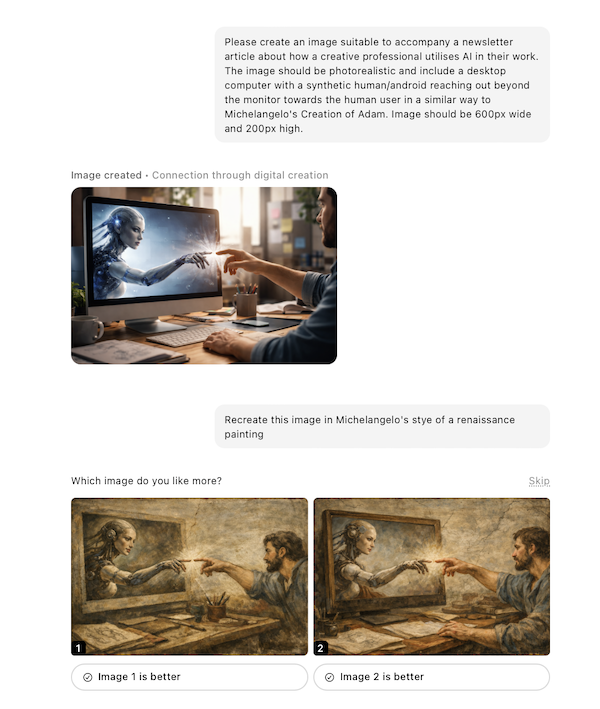
Author generated image using ChatGPT
Which raises an interesting point about using AI as a creative. Working with AI is a collaborative process but much of the hard work is still on the creative. YOU have to create the prompt. YOU have to judge the output. And YOU have to provide further input/correction/guidance to progress further. This means your sense of taste or being able to determine what is GOOD becomes incredibly important. Taste reflects your individual life experience, influences, and observations. It’s what makes you individual and human.
I’ve seen many people who are new to AI, feed some prompts and are happy with the first few outputs received. These are “good enough” and the user moves on. But rarely does AI get things right in the first instance.
At the moment I might ask AI to generate an image to accompany a newsletter or blog article (like the one used above). And occasionally to create a simple black and white drawing based on my original sketches to accompany early storyboards and concepts because I lack the drawing skills to convey my ideas in a clear way. (I don’t want my collaborators to get distracted by people with disproportionate sized heads or hands.)
However, if I want to generate a logo or concept art for a project I will collaborate with a graphic designer or 2D artist. That’s because I value their creative input and expertise and often these seemingly small tasks are in fact the beginning of working relationships that are incredibly valuable for the lifetime of a creative project.
Creative Writing
With my current focus on storytelling and narrative design, I was VERY hesitant about AI-ing myself out of a job.
In the beginning (~2 years ago) I experimented with creating storylines, characters and branching narratives using ChatGPT. But honestly – it was terrible.
The main issues were that the generated ideas were very simple, stereotypical and frankly boring. But that early experimentation taught me valuable lessons:
It was not “good enough” (from my perspective) to assist me in what I wanted to create.
It wasn’t ready for me to integrate into my creative process in a meaningful way.
Sometimes AI impeded my creative process. If I asked it to brainstorm plot scenarios, they never seemed quite right. But in the process of trying to “fix it” and guide it to something better, I got bogged down in its generated mess. When I went back to the drawing board, I felt my ideas were weighed down by that earlier brainstorming process.
Creative Collaborator
I have also experimented with using AI as a creative collaborator or sounding board while working on my projects.
Some of the issues I encountered were that the AI is often sycophantic (agreeing with everything I said) and required a lot of prompting or training to provide constructive feedback.
I learned that a real person is much better than an AI for collaboration. Simply because I value that person’s experience, perspective and taste.
So When Do I Use AI?
As you can see, I don’t really use AI at the moment for creative tasks. I’ll continue experimenting and am open to using it in the future if its fit for purpose and aligned with my creative goals.,
So if I don’t use AI for creative processes what do I use it for?
Learning And Upskilling With A Personal Tutor
One of my favourite ways of using AI is to help me learn new skills and act as a personal tutor. For example, I am currently working on my coding skills with C# so I use AI to
Check my work for any potential errors. I also ask it to explain why it’s wrong and how I can improve.
Help me troubleshoot when the tutorial I’m following doesn’t align with the results I see in the console. Sometimes it has nothing to with the tutorial content but the operating system version, software updates etc
Recommend further online resources, materials, tutorials.
Prototyping Concepts and Game Mechanics
A few months ago I experimented with Google AI Studio to rapidly prototype an idea I had for a game where you stack and retrieve sea containers called “Stack Stacks” (inspired by the containers in Fremantle habour that I pass while catching the train.)
The really cool thing about this platform is that the split screen displays my conversation in the left pane while updating the game preview as a web app in real time in the right pane. Even cooler is that I can see the web browser code by toggling to that pane.
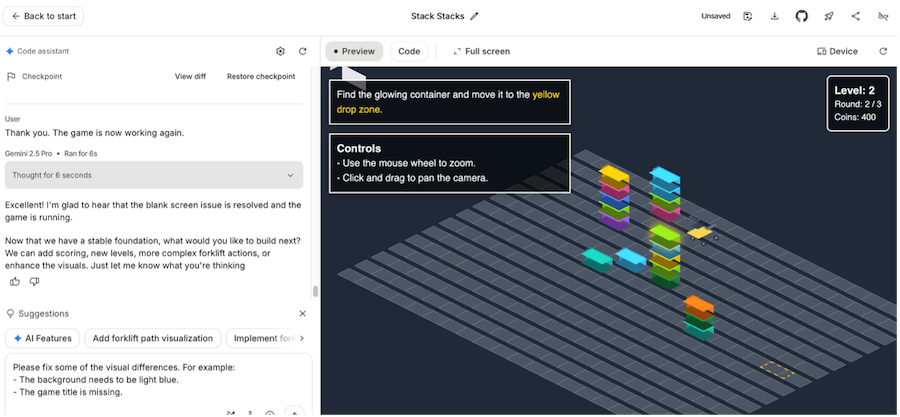
As a designer without fully fledged developer skills, this setup is incredible useful to test and iterate game mechanics on my own. While the process wasn’t perfect and I had some usual AI headaches (the platform not understanding some of my visual prompts, getting stuck in a loop trying to fix something, fixing one thing while breaking another) but it got me a lot further than if I had been trying to code it up myself from scratch.
I also learned a lot about how to code this type of game in html, css and Javascript by inspecting the code. Even cooler is that I could ask the AI questions about the code itself!
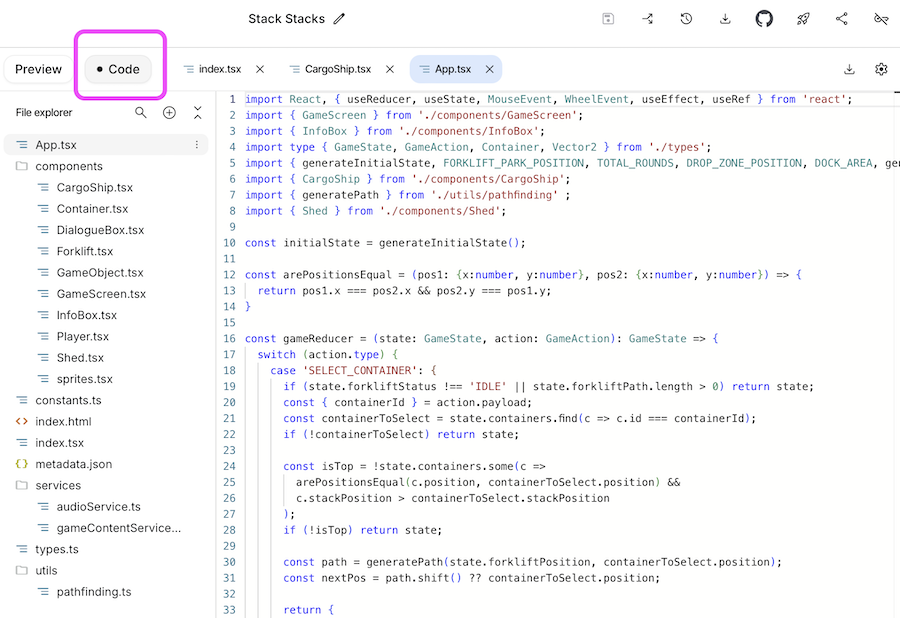
I would definitely use this platform again to prototype ideas or even create a basic design that I could show a developer to communicate my ideas more clearly than just 2D diagrams and sketches.
Administration Tasks!
As a freelancer, I don’t have a law firm, accounting firm, or marketing agency on round-the-clock retainers. Although I have used their services for larger projects (with larger budgets!) I generally use AI to research, understand an issue and educate myself before progressing and enlisting the assistance of (human) professionals if necessary.
Some tasks that I have used AI for include
Compare two complex (and very long!) documents for a simple overview of changes and differences.
Review a funding grant to determine whether I am eligible to apply.
Trouble shooting or asking questions when I get stuck using online platforms or software (and their own documentation sucks)..
Research
A game changer for me has been using AI to conduct preliminary research. This is a time consuming task that is not as rewarding as my other creative work so I’m more than happy to enlist AI to assist me to
Create databases of relevant projects, case studies, published works
Provide an update of the current landscape in XR hardware, software, news (this can be difficult to keep up on top of with the industry moving so quickly)
Create a summary of competitors or similar projects and their features
List of funding grants I can apply for
List of events including seminars, workshops and conferences that I could attend or give presentations
Specific statistics or links to white papers and industry reports
The caveat here is that you should still check the details generated particularly if facts or data are critical to your particular project.
Generic Copywriting
As I’ve mentioned before, I write all my newsletters and blog articles without AI. I enjoy the process and it helps sharpen my writing skills.
But what I don’t enjoy is
Reducing my 500 word bio to 150 words because an upcoming event needs my bio to fit within its online word count.
Completing three different online forms which each require three different summaries of my presentation with only very slightly different emphasis depending on the conference theme.
Adapting previously written copy for different marketing formats (social media, press releases, blog article, product copy etc).
Essentially as a creative professional and freelancer I want to free up my time to focus on truly creative tasks that I enjoy and that help pay my bills.
Lessons From Experimenting With AI
Here’s an overview of what I have learned so far:
Play and experiment with AI yourself. Don’t rely on others’ second hand experience to form your own opinions.
You get interesting outputs from interesting and good quality prompts. This takes practice.
Using AI is a collaborative process. And it rarely gets it right the first time.
Working relationships with human colleagues are incredibly important on creative projects and can’t be replaced by AI. But I’m open to those creatives experimenting with AI in a way that supports their creative process.
AI isn’t suitable for all tasks.
Use AI to help you with less rewarding tasks.
Don’t use AI to do tasks that you wish to maintain within your skillset..
An individual’s taste is as important as their skill in using AI.
AI is not always correct and can hallucinate. You should still check the details and facts if these are critical to your particular project.
If a task is important or has significant potential legal or financial issues, enlist the services of a professional.
Summary
If you’re interested in exploring how to utilise AI as a beginner, I recommend checking out Allie K Miller’s website. She shares a host of practical tips and tools on how to get started and has a great way of explaining things in a clear and easy follow way.
Did you find this overview useful?Are you using AI as a creative? How have you used it on your projects? I’m keen to hear about your experiences so do feel free to drop me a line at hey@nataliemarinho.com